bilibili (CN) APK | Enjoy Videos & Livestreams 2026
1 minutes ago
355 MB
6.2.6
Android 7.0+
1.M+

Description
Looking for a video platform that goes beyond ordinary streaming? bilibili (CN) brings together anime, gaming, music, livestreams, creator content, and an active fan community in one Android app. Its combination of on-demand entertainment and interactive features makes it especially appealing to users interested in anime, Chinese entertainment, gaming, and online fandoms.
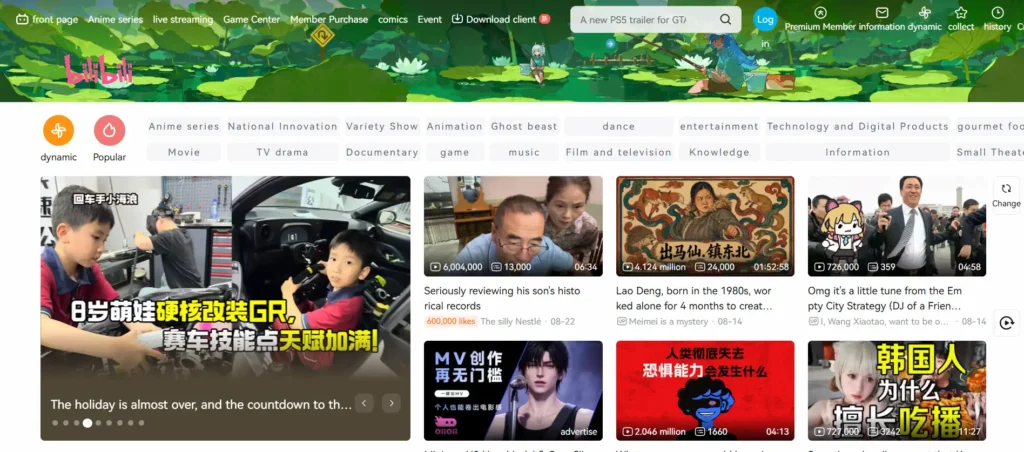
With bilibili – All Your Fav Videos, you can discover videos from different categories, follow your favorite UP creators, participate in discussions, watch live broadcasts, and use danmu comments to see audience reactions while a video is playing. 9xflix is also an entertainment APK that offers users a convenient way to enjoy movies and web series.
What Is bilibili (CN)?
bilibili is a video and livestreaming platform built around entertainment and community interaction. The app offers a wide range of content, including anime, Chinese dramas, films, music, gaming, esports, technology, culture, cosplay, and fan-created media.
Unlike a conventional video player, bilibili places considerable emphasis on community participation. Users can follow creators, interact with other viewers, save interesting content, and contribute their own videos, audio, articles, animations, and other creations.
The platform also supports features such as viewing history, favorites, subscriptions, and offline caching for supported content.
Key Features
Anime, Dramas, and Entertainment
It provides access to a broad selection of entertainment categories. Depending on availability, users can explore:
- Anime and animation
- Chinese dramas and original programs
- Movies and variety shows
- Music and performances
- Gaming and esports
- Cosplay and fan content
- Technology and cultural videos
- Fan theories and community creations
The variety makes it possible to browse by interest rather than relying on a single type of content.
Danmu Comments for Interactive Viewing
One of it’s most recognizable features is danmu, also known as scrolling or bullet comments.
When enabled, comments from viewers can appear directly over the video as it plays. People may use them to react to funny scenes, important moments, announcements, or live events.
If the comments make the screen too crowded, you can adjust the display or disable danmu completely. This allows you to choose between a more interactive viewing experience and a cleaner playback screen.
Gaming Livestreams and Esports
Gaming fans can use it to discover live broadcasts, esports coverage, and gaming-related channels.
Some events may provide features such as high-resolution viewing, alternative commentary options, or interactive elements such as polls. Available options depend on the individual livestream or event.
Follow UP Creators
Creators on this platform are commonly referred to as UP creators. You can follow creators whose content matches your interests and keep up with their latest uploads and posts.
The platform supports more than conventional video publishing. Depending on the creator and content type, users can encounter:
- Videos
- Audio
- Articles
- Animations
- Dubs
- Memes
- Fan creations
- Community posts
This creator-focused approach makes it both a content platform and an online community.
Videos, Audio, Photos, and Written Content
bilibili isn’t limited to video streaming. Users can also discover audio programs, podcasts, photo collections, and written columns.
When you find content you want to revisit, supported items can be added to your favorites. Certain videos can also be cached for offline viewing, allowing you to continue watching when an internet connection isn’t available.
Playback and Account Features
The bilibili Android app includes several features designed to make content easier to manage across sessions.
After signing in, supported account features can keep your watch history, subscriptions, and favorites associated with your account. This can be useful when moving between devices.
Playback and viewing options may also vary depending on the specific content. In addition, the app supports AI Dubbing for selected content, which can help make some creator videos accessible in additional languages.
How to Use on Android
Getting started with bilibili is straightforward. After installing the app, you can browse its categories and begin watching content without spending time configuring complicated settings.
Step 1: Explore Your Interests
Open it and browse categories such as anime, gaming, music, technology, culture, or other available topics.
Step 2: Start Watching
Choose a video or livestream and begin playback. If you want to see reactions from other viewers, enable the danmu feature during playback.
Step 3: Customize Danmu
Use the available danmu controls to keep comments visible, reduce their presence, fold them, or turn them off completely.
Step 4: Follow Creators and Save Content
If you discover an UP creator you enjoy, follow their account for future updates. You can also add supported videos and other content to your favorites.
Step 5: Prepare Content for Offline Viewing
For videos that support caching, use the cache option while you have an internet connection. You can then access the cached content later when you’re offline.
Why Use bilibili (CN)?
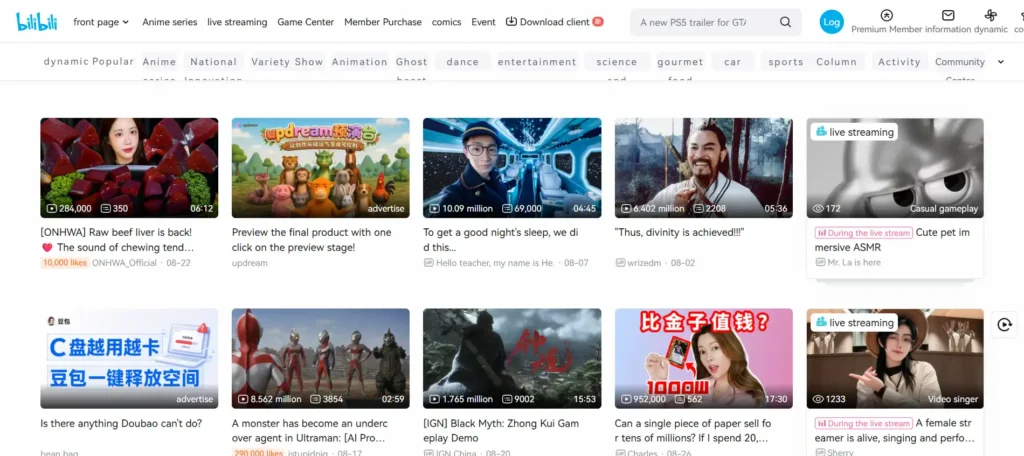
This is particularly suited to users who enjoy anime, gaming, Chinese entertainment, creator videos, and online communities. Its combination of streaming and social interaction gives viewers more ways to engage with the content they watch.
Some of its notable advantages include:
- A wide range of entertainment and community content
- Interactive danmu comments
- Anime and animation-focused content
- Gaming livestreams and esports
- UP creator subscriptions
- Video, audio, photo, and written content
- Favorites and viewing history
- Offline caching for supported videos
- Additional language support
- AI Dubbing for selected content
What’s New in this Version?
The latest listed version is 6.3.0, updated on August 26, 2026.
The latest update adds support for more languages, giving users additional language options when using the app.
As with any app update, available features can vary depending on the device, account, region, and specific content.
Final Thoughts
bilibili (CN) offers a different approach to online entertainment by combining video streaming with creator communities and real-time viewer interaction. From anime and gaming to music, livestreams, Chinese entertainment, and fan-created content, the platform provides plenty of ways to discover and engage with content.
The addition of danmu comments makes viewing more interactive, while creator subscriptions, favorites, history, and supported offline caching make it easier to organize the content you enjoy. If you’re interested in exploring a community-driven video platform on Android, bilibili is worth checking out.
Download links
How to install bilibili (CN) APK | Enjoy Videos & Livestreams 2026 APK?
1. Tap the downloaded bilibili (CN) APK | Enjoy Videos & Livestreams 2026 APK file.
2. Touch install.
3. Follow the steps on the screen.